
In testing · Coming soon for iPhone
Faithful in the small things.
Life with God is a gift, not a grade. werkLife keeps the day’s verse, a few small practices and Sunday’s sermon in one quiet place, and helps you notice Him in the ordinary hours in between.
For iPhone. Small steps, no scores, no account.

“Whoever is faithful with very little will also be faithful with much.”
Today
The day, with the Word at the top.
Today is where you do things. It holds one verse, a few small practices, and room to notice where God met you.
- The day’s verse first. Today opens on one verse, set on parchment, the only paper thing on the page. Take a moment with it, or carry on with your day.
- Practices on a timeline. Each one sits under the moment you tied it to, in your own words (“After I pour my coffee”), on a rail colored by morning, afternoon and evening. A Now marker shows where the day has got to. What’s later is dimmed, not hidden.
- Done, a small step, or rest. Tap a practice’s circle when it’s done, or swipe for its small step or to rest it. A small step counts as showing up. The week shows as dots, never bars or percentages, and there’s no streak to keep.
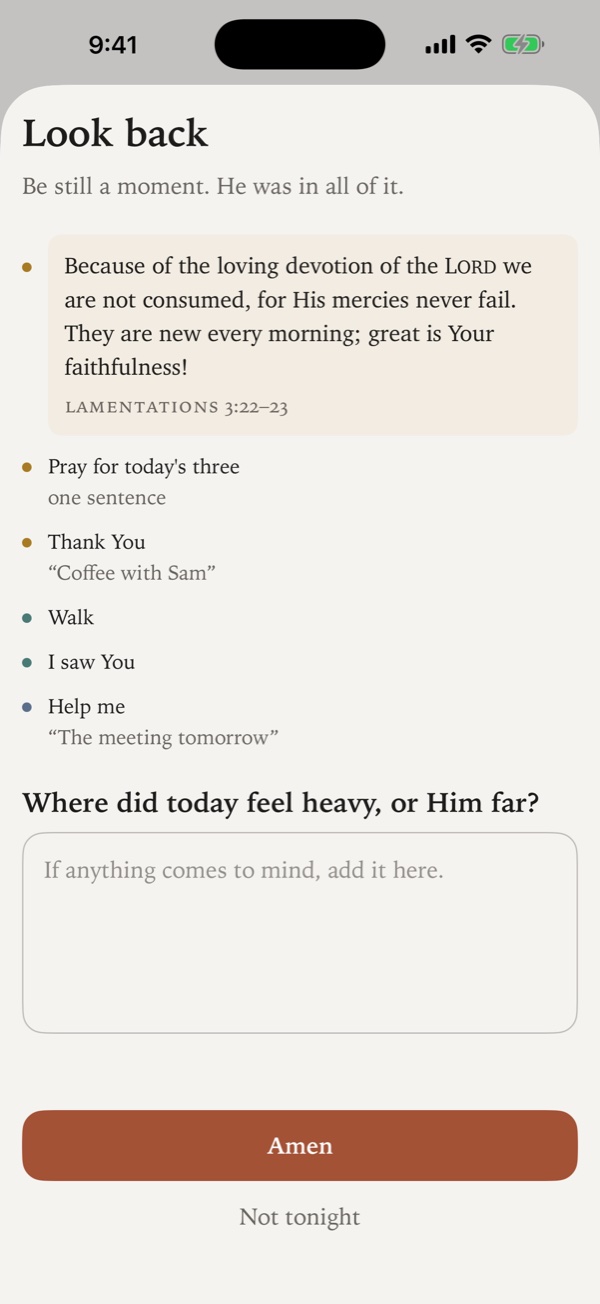
- Look back, in the evening. As the day closes, the verse card becomes Look back: the practices you kept, the moments you tapped, one question, and Amen.
Seeing God in the little moments
Four quick taps.
They’re docked at the bottom of Today all day, where a thumb can reach them. Each one is a short prayer. A tap is enough, and a word or two can follow. There are no counts, ever.
- Thank You
- I saw You
- Help me
- Be near
- Thank You
- For something good, as it happens.
- I saw You
- For a moment you noticed Him at work.
- Help me
- For what you can’t carry alone.
- Be near
- For the hard hours. A lament, with no words needed.
Sermons
Sunday, carried into the week.
Sermon notes that keep up while you listen, and go somewhere afterward.
- Points and verses as you type. A point becomes a heading. Type a verse like Eph 2:10 and it’s tagged right in the line, ready to open.
- Calls to action, onto Today. Tie one to a moment in your day (“On the drive home”) and it waits on Today’s timeline until it’s done.
- Series, counted for you. A new note fills in from your last one on the same day of the week and carries a running series on. Its week is counted, never typed.
- A one-minute wrap-up. Carry it: the main idea, calls to action, a verse for the week, who to pray for, and topics. All of it is optional. The verse you choose leads Today for the next three days.
- Find it again. Browse by sermon, by topic, or by verse (everywhere a verse has met you), or search across all of it.
- Yours to keep. Done saves the note as a plain-text file, wherever you choose.


Read
A shelf, not an obligation.
Everything you read, and what you took from it.
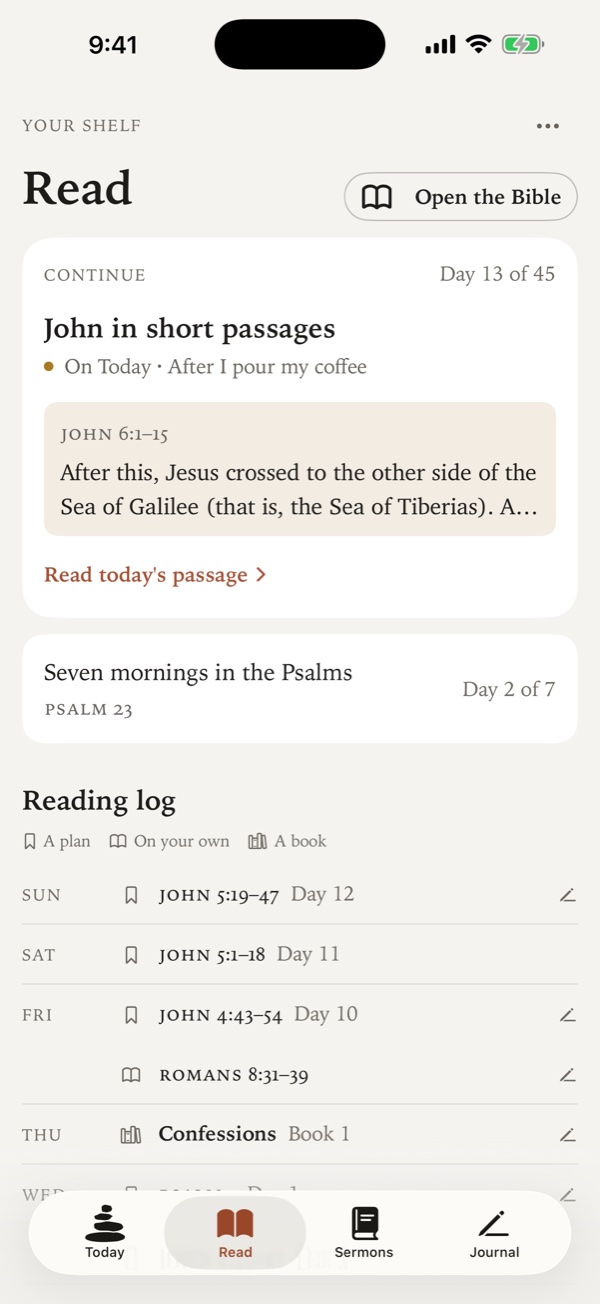
- Continue, never behind. A plan opens to its next day: the first one you haven’t read. A missed week is never “behind”.
- Open the Bible. Read any passage on your own. Tap a verse, or two for a range, to quote it into your note.
- Devotionals, with their guides. A devotional’s day brings its own guides, before or after the passage, and questions that open a box only when you tap them.
- A reading log. One line per read, marked by kind (the day’s verse, a plan, on your own, a book), with a pencil where you wrote something.
- One read, wherever you mark it. Finish a plan’s day from Read or from a practice on Today, and it’s done in both places.
The church year
Openings, drawn in pencil.
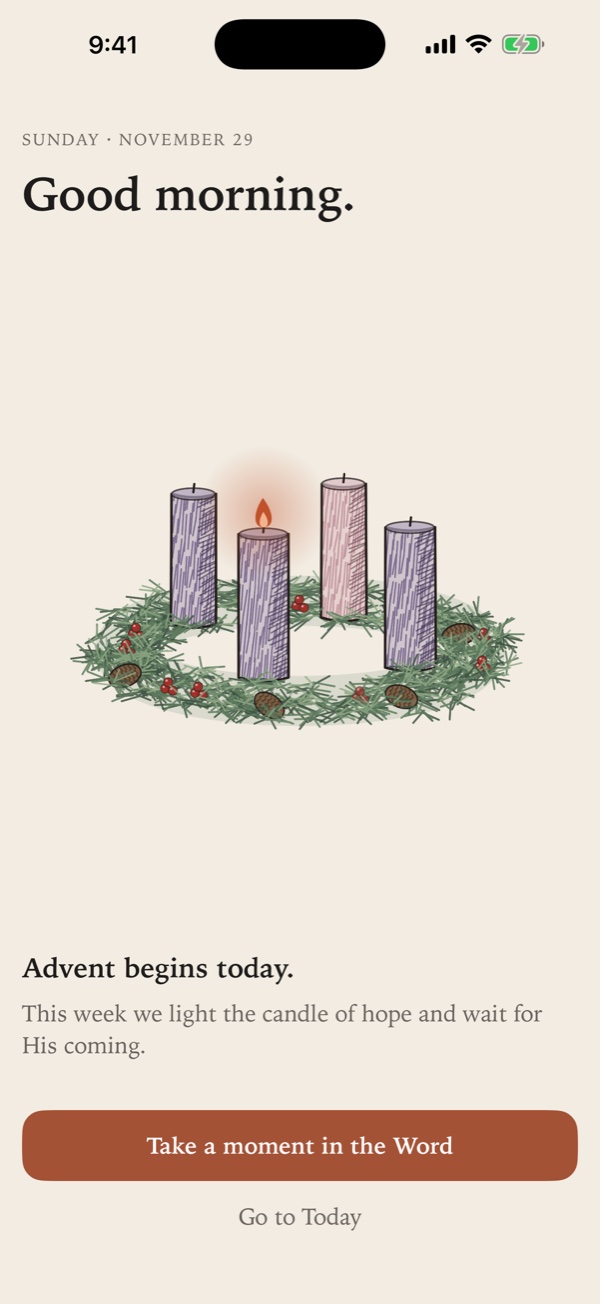
Each day starts with a short welcome: the date, a greeting and the day’s verse, with a moment to sit with it. On the days that matter, the welcome draws itself.
- Advent. The wreath is sketched on parchment and the first candle lit. Each Sunday, a candlelighter carries the flame on to the next.
- Christmas Day. The story draws itself in graphite, from the road to Bethlehem to the stable, and the Christ candle is lit.
- New Year’s Day. An Ebenezer: one more stone is lowered onto a cairn, and the moment asks where the Lord helped you this year.
- Lent. An olive spray grows one leaf a day, by the calendar, not by how Lent is going.
- Good Friday to Easter. A sealed tomb on a quiet hillside. On Easter morning the seal breaks and the branch blooms.
- And more. All Hallows’ Eve, Thanksgiving, St. Valentine’s Day, and the first day of each season.
With Reduce Motion or VoiceOver on, every opening appears finished.
What you write stays with you.
werkLife is a private place to pray and take notes. There’s no account, and it doesn’t send what you write anywhere. We never see it.
- No account, no sign-in
- No analytics, ads or tracking of any kind
- Built only on Apple’s own frameworks, with no third-party code
- Your notes stay on your iPhone
- Online only to fetch Scripture, never what you write
- Done saves a copy wherever you choose
In testing
Coming soon.
werkLife is in testing on iPhone now. If you’d like to try it early, or just hear when it’s out, send a note.
Or email privacy@werkey.tech.